KMAT Manufacturer Cost Model App
Accurate, explainable manufacturing costs and faster RFQ quotes, powered by your own data in Snowflake
Overview
Quoting configurable products is complex. Every engine, cab, wheel, or body option changes the bill of materials, the routing, and the final cost. The KMAT Manufacturer Cost Model App brings this into one Snowflake-native application that calculates product costs from your own master data and turns customer RFQs into reliable quotes.
Your data stays in your Snowflake account. The app is fully rule-based.
What It Does
Configuration-based cost simulation
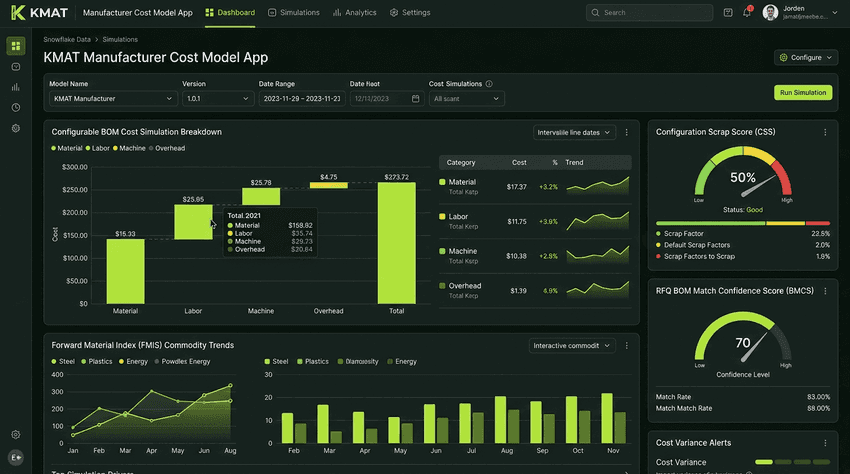
Select a product, choose its characteristics, and run a simulation. The app uses a dependency rule engine to include only the components, operations, and overheads that apply, then returns a full breakdown of material, labor, machine, and overhead costs.
Built-in cost risk adjustments
- Configuration Scrap Score (CSS): accounts for scrap risk based on configuration complexity.
- Forward Material Index (FMIS): adjusts commodity-sensitive materials using forward-looking price forecasts.
- Tool Degradation Factor (TDS): reflects tool and machine wear in maintenance costs.
RFQ intake and quoting
Paste RFQ text or upload PDF, DOCX, or TXT documents. The app extracts product characteristics, maps them to your configured values, and runs the quote workflow.
Quote confidence scoring
Every RFQ gets a BOM Match Confidence Score (BMCS) that shows whether the quote is auto approved, recommended for review, or requires mandatory engineering review.
Scenario analysis
Compare configurations side by side, review scenario history, and see which components drive cost.
Key Benefits
Faster quoting: Cut manual effort in turning RFQs into cost configurations.
Transparent results: Every figure is explainable and auditable, and fallbacks are clearly flagged.
Risk-aware pricing: Scrap, commodity, and tool-wear risks are built into the cost.
Built-in governance: Confidence thresholds, route low-confidence quotes to engineering review.
Secure by design: Runs entirely inside your Snowflake environment.
Flexible product coverage: Supports trucks, cars, buses, and any other configurable product line you define.
Who It’s For
How It Works
Connect your data
Link your BOM, routing, cost, rate, overhead, and rule tables to the app.
Select and configure
Choose a product and its characteristics or process an RFQ document.
Simulate
Run the cost simulation and review the baseline and risk-adjusted results.
Review and quote
Check the confidence score, compare scenarios, and prepare your quote.
Get Started
Available on the Snowflake Marketplace. Contact us at ai.support@identifyyou.in for onboarding, product setup, or a walkthrough.
Cost results depend on the quality and completeness of the master data and rules configured in your account and should be reviewed through your normal commercial and engineering approval processes.
Need to turn calculated manufacturing costs into policy-driven prices and approval workflows?
Explore the KMAT Manufacturer Price Model App